




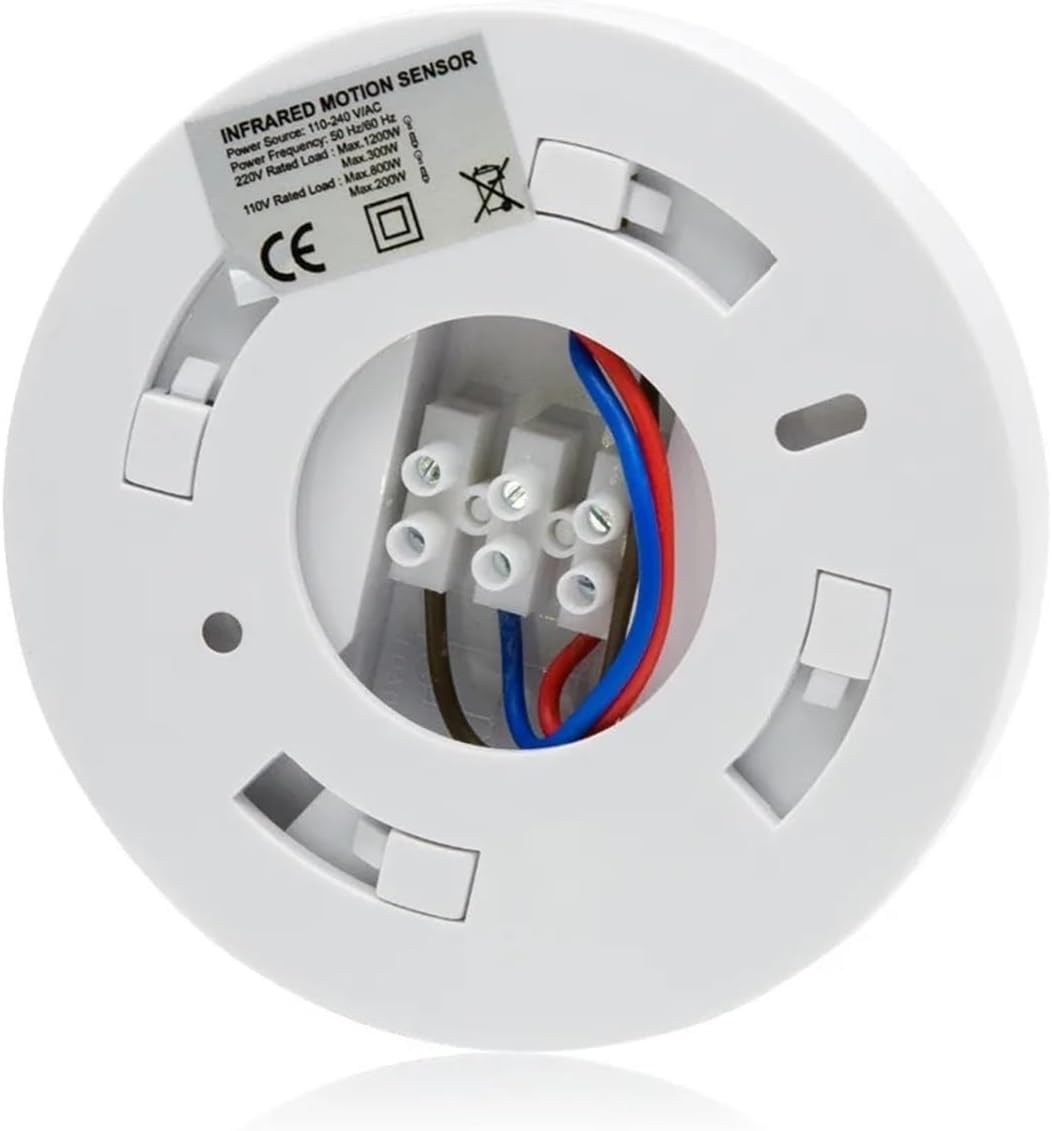

360 Degree Ceiling Mount Occupancy Sensor 110-240v Motion Sensor Switch High Sensitive Movement Light Switch
 5.0 (138 items)
 Limited Time Sale
$54.00 cheaper than the new price!!
Free cash-on-delivery fees for purchases over $99
Product details
| Management number | 212396656 | Release Date | 2026/04/06 | List Price | $36.00 | Model Number | 212396656 | ||
|---|---|---|---|---|---|---|---|---|---|
| Category | |||||||||
360 Degree Ceiling Mount Occupancy Sensor, 110-240V PIR Motion Sensor Switch, High Sensitive Movement Detector Light Switch, Neutral Required(Max Detection Distance: 6 m)The ceiling mount occupancy sensor is ideally suited to use on circulation areas, store rooms, toilets, kitchens, common stairs wells or corridors where there are frequently passing in and out of an area and theoften gets left on all day.SPECIFICATIONDescriptions:Power Input: 110 -240V/ACProduct Size: 115mm(D)×50mm(H)Power : 50Hz/ 60Hz<;93%RHWorking Temperature: -20°C~+40°CInstallation Height: 2.2-4mAmbient Light: 3-2000Lux (adjustable)Time-Delay: Min: 10sec±3sec Max: 7min±2minPower Consumption: 0.45W (working) 0.1W (static)110V Rated Load: Max.800W (incandescent lamp); Max.200W (energy-saving lamp)220V Rated Load: Max.1200W (incandescent lamp); Max.300W (energy-saving lamp)Motion Detecting Speed: 0.6 ~1.5m/s<;24°C)Packing Lists:1 x Motion Detector Switch2 x Screws1 x User ManualFUNCTION:1.Can identify day and night: The consumer can adjust work ambient light. It can work in the daytime and at night when it is adjusted on the "sun" position (max). It can work in the ambient light less than 3LUX when it is adjusted on the "moon" position (min). As for the adjustment pattern, please refer to the testing pattern.2.Time-Delay is added continually: When it receives the second induction signals after the first induction, it will compute time once more on the basic of the first time-delay rest.3.Time-Delay is adjustable. It can be set according to the consumer's desire. The minimum time is 10sec±3sec. The maximum is 7min±2min.INSTALLATION:(see the figure) 1.Switch off the power.2.Turn clockwise the bottom-stand and take off it. The power wire cross the hole in the middle of bottom-stand.3.The bottom-stand is fixed on the selected position with inflated screw.4.Connect the power and the load into the connection-wire column of the sensor according to connection-wire diagram.5.The sensor aimed at the mouth of bottom-stand and turned anti-clockwise.TEST:1.Turn the TIME knob to minimum (-) position with anti-clockwise. Turn the LUX knob to SUN position with anti-clockwise.2.Switch on the power; the controlled load and indication lamp both are not working. Preheat 30 sec later, the load and indication lamp should be turned on synchronization. In the absence of no inductor signals, the load should be stopped working within 5-30sec, the indicator lamp is turned off.3.After the first sense is finished, and it will sense again after 5~10sec. The load should work. When there is no inductor signals in the indicator lamp, the load should be stopped working within 5-15sec.4T.urn LUX knob clockwise on the minimum (MOON position). If it is adjusted in the less than 3LUX, the inductor load should not work after load stop working. If you cover the detection window with the opaque objects (towel etc), the load work .under no induction signal condition, the load should stop working within 5-15sec.Note: when testing in daylight, please turn LUX knob to (SUN) position, otherwise the sensor lamp could not work!NOTES:1.Electrician or experienced human can install it.2.The unrest objects can't be regarded the installation basis-face.3.In front of the detection window there aren't hinder or unrest objects effecting detection.4.Avoid installing it near air temperature alteration zones for example: air condition, central heating, etc.5.Please don't open the case for your safety if you find the hitch after installation.6.If there are some difference between instruction and the function the product has, please give priority to product and sorry not to inform you additionally.SOME PROBLEM AND SOLVED WAYThe load don't work:a. Check the power and the load.b. Whether the indicator light is turned on after sensing? If yes, please check load.c. If the indicator light does not turn on after sensing, please check if the working light corresponds to the ambient light.d. Please check if the working voltage corresponds to the power source.The sensitivity is poor:a. Please check if in front of the detection window there are hinder that effect to receive the signals.b. Please check the ambient temperature.c. Please check if the signals source is in the detection fields.d. Please check the installation height.The sensor can't shut automatically the load:a. If there are continual signals in the detection fields.b. If the time delay is set to the longest.c. If the power correspond to the instruction.d. If the air temperature change near the sensor, air condition or central heating etc.Material : PlasticSwitch Type : Sensor SwitchModel Number : 037Features : PIR motion sensor switchItem Type : SWITCHESIs Smart Device : NoOrigin : Mainland ChinaPower Input : 110 -240V/ACPower : 50Hz/ 60Hz<;93%RHWorking Temperature : -20°C~+40°CInstallation Height : 2.2-4mAmbient Light : 3-2000Lux (adjustable)Time-Delay : Min: 10sec±3sec Max: 7min±2minPower Consumption : 0.45W (working) 0.1W (static)110V Rated Load : Max.800W (incandescent lamp); Max.200W (energy-saving lamp)220V Rated Load : Max.1200W (incandescent lamp); Max.300W (energy-saving lamp)Motion Detecting Speed : 0.6 ~1.5m/sDetection Distance : 6m max (
- LGYMSZSS 360 Degree Ceiling Mount Occupancy Sensor 110-240v Motion Sensor Switch High Sensitive Movement Light Switch
| Brand | LGYMSZSS |
|---|---|
| Color | One Color |
| Manufacturer | LGYMSZSS |
| Model Number | VAXGTYAYA |
| Mfr Part Number | VAXGTYAYA |
Bestseller ranking
Motion Detectors


Correction of product information
If you notice any omissions or errors in the product information on this page, please use the correction request form below.
Correction Request Form